• The Help Site logo

  • Contact
    • The Basics
      • Logging In and Out
      • Document Tree
      • Navigation & logo
      • Quick Actions Menu
      • Footers
      • Fonts
    • Website Design & Layout
      • The Wrapper: Start Here
      • Primary Navigation
      • Footers
      • Social Icons
      • Facebook Sharing Image
      • Button colors, shapes
      • Sidebar Additions
      • Logos
      • Menubar
      • Code (eg. Google Analytics)
    • How to...
      • The Document Tree
      • Create a Page
      • Choosing a Template
      • Basic Page Layout
      • Editing a Page
      • Adding Content: Text
      • Styling text: Blockquotes
      • Adding Content: Images
      • Cropping & Resizing Images
      • Adding Content: Links & PDFs
      • Adding Content: Video
      • Viewing a page
      • Page Commands: Move, Hide, Delete
      • Feeds: Blog, Events, News, Logos
      • META Data
      • Add code to the template (Google Analytics, etc.)
      • PDF Viewable Page
      • Sitewide Navigation: Create & Change
      • Dropdowns and Page Nav: Moving things around
    • Page and Page Top Displays
      • Page top video or photos
      • Utility items: Anchors
      • Accordions
      • Code Blocks
      • Headings or Text
      • Image
      • Image Strip
      • Lists with Icons
      • Nav Bar
      • Overlay Block
      • Photo and copy
      • Utility items: Spacers
      • Sliders and Carousels
      • Tabbed Content
      • Text and/or Button
    • The Content Grid
    • Content Features
      • Blogging
      • Events Calendar
      • Media
      • Galleries
      • News
      • Priorities
      • Publication Library
      • Staff Section
  • The Basics
    • Logging In and Out
    • Document Tree
    • Navigation & logo
    • Quick Actions Menu
    • Footers
    • Fonts
  • Website Design & Layout
    • The Wrapper: Start Here
    • Primary Navigation
    • Footers
    • Social Icons
    • Facebook Sharing Image
    • Button colors, shapes
    • Sidebar Additions
    • Logos
    • Menubar
    • Code (eg. Google Analytics)
  • How to...
    • The Document Tree
    • Create a Page
    • Choosing a Template
    • Basic Page Layout
    • Editing a Page
    • Adding Content: Text
    • Styling text: Blockquotes
    • Adding Content: Images
    • Cropping & Resizing Images
    • Adding Content: Links & PDFs
    • Adding Content: Video
    • Viewing a page
    • Page Commands: Move, Hide, Delete
    • Feeds: Blog, Events, News, Logos
    • META Data
    • Add code to the template (Google Analytics, etc.)
    • PDF Viewable Page
    • Sitewide Navigation: Create & Change
    • Dropdowns and Page Nav: Moving things around
  • Page and Page Top Displays
    • Page top video or photos
    • Utility items: Anchors
    • Accordions
    • Code Blocks
    • Headings or Text
    • Image
    • Image Strip
    • Lists with Icons
    • Nav Bar
    • Overlay Block
    • Photo and copy
    • Utility items: Spacers
    • Sliders and Carousels
    • Tabbed Content
    • Text and/or Button
  • The Content Grid
  • Content Features
    • Blogging
    • Events Calendar
    • Media
    • Galleries
    • News
    • Priorities
    • Publication Library
    • Staff Section
Contact
The Help Site

Creative Consulting • Design for People • Smarter Programming • Global Publishing • Contact: Holly@HollyWorks.com
Digital publishing by Boilerplate Books | Privacy Policy & Accessibility | Southern Maine | ProcessWire Made Easy: Tutorials

BoilerPlate Books, LLC | Holly Valero | HollyWorks Web Design | LinkTr.ee

Accordions

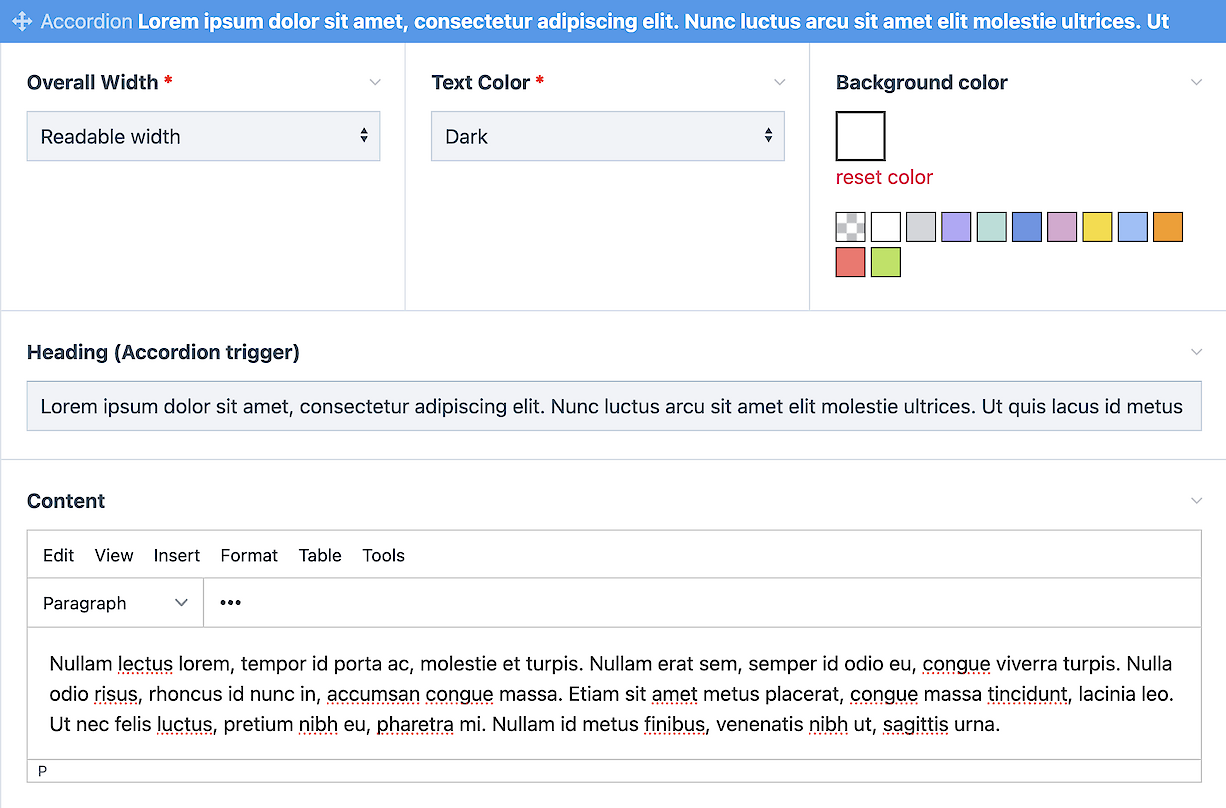
Accordions are an easy way to organize things like an FAQ; short questions and short answers. 

  1. Click the link to add an accordion - you can have as many or as few as you like...
  2. Choose your text and background colors
  3. Add a heading
  4. Add your content. Accordions support all kinds of content, but try not to load up your accordions with War and Peace. :-)

  • Sample Accordion Header

    Aenean scelerisque nibh eget leo blandit, nec consequat quam commodo. Proin ac massa vel eros sodales tempus. Class aptent taciti sociosqu ad litora torquent per conubia nostra, per inceptos himenaeos. Nulla consequat leo at molestie fermentum. Fusce euismod massa id libero scelerisque, ac commodo mi ultrices. Nulla facilisi. Suspendisse ut turpis sem. Morbi commodo turpis vehicula, cursus nibh et, tempor felis. Nulla iaculis ullamcorper purus. Nulla fermentum ultricies sodales.

  • This is what they look like

    Aenean scelerisque nibh eget leo blandit, nec consequat quam commodo. Proin ac massa vel eros sodales tempus. Class aptent taciti sociosqu ad litora torquent per conubia nostra, per inceptos himenaeos. Nulla consequat leo at molestie fermentum. Fusce euismod massa id libero scelerisque, ac commodo mi ultrices. Nulla facilisi. Suspendisse ut turpis sem. Morbi commodo turpis vehicula, cursus nibh et, tempor felis. Nulla iaculis ullamcorper purus. Nulla fermentum ultricies sodales.

The Help Site

Creative Consulting • Design for People • Smarter Programming • Global Publishing • Contact: Holly@HollyWorks.com
Digital publishing by Boilerplate Books | Privacy Policy & Accessibility | Southern Maine | ProcessWire Made Easy: Tutorials

BoilerPlate Books, LLC | Holly Valero | HollyWorks Web Design | LinkTr.ee