• The Help Site logo

  • Contact
    • The Basics
      • Logging In and Out
      • Document Tree
      • Navigation & logo
      • Quick Actions Menu
      • Footers
      • Fonts
    • Website Design & Layout
      • The Wrapper: Start Here
      • Primary Navigation
      • Footers
      • Social Icons
      • Facebook Sharing Image
      • Button colors, shapes
      • Sidebar Additions
      • Logos
      • Menubar
      • Code (eg. Google Analytics)
    • How to...
      • The Document Tree
      • Create a Page
      • Choosing a Template
      • Basic Page Layout
      • Editing a Page
      • Adding Content: Text
      • Styling text: Blockquotes
      • Adding Content: Images
      • Cropping & Resizing Images
      • Adding Content: Links & PDFs
      • Adding Content: Video
      • Viewing a page
      • Page Commands: Move, Hide, Delete
      • Feeds: Blog, Events, News, Logos
      • META Data
      • Add code to the template (Google Analytics, etc.)
      • PDF Viewable Page
      • Sitewide Navigation: Create & Change
      • Dropdowns and Page Nav: Moving things around
    • Page and Page Top Displays
      • Page top video or photos
      • Utility items: Anchors
      • Accordions
      • Code Blocks
      • Headings or Text
      • Image
      • Image Strip
      • Lists with Icons
      • Nav Bar
      • Overlay Block
      • Photo and copy
      • Utility items: Spacers
      • Sliders and Carousels
      • Tabbed Content
      • Text and/or Button
    • The Content Grid
    • Content Features
      • Blogging
      • Events Calendar
      • Media
      • Galleries
      • News
      • Priorities
      • Publication Library
      • Staff Section
  • The Basics
    • Logging In and Out
    • Document Tree
    • Navigation & logo
    • Quick Actions Menu
    • Footers
    • Fonts
  • Website Design & Layout
    • The Wrapper: Start Here
    • Primary Navigation
    • Footers
    • Social Icons
    • Facebook Sharing Image
    • Button colors, shapes
    • Sidebar Additions
    • Logos
    • Menubar
    • Code (eg. Google Analytics)
  • How to...
    • The Document Tree
    • Create a Page
    • Choosing a Template
    • Basic Page Layout
    • Editing a Page
    • Adding Content: Text
    • Styling text: Blockquotes
    • Adding Content: Images
    • Cropping & Resizing Images
    • Adding Content: Links & PDFs
    • Adding Content: Video
    • Viewing a page
    • Page Commands: Move, Hide, Delete
    • Feeds: Blog, Events, News, Logos
    • META Data
    • Add code to the template (Google Analytics, etc.)
    • PDF Viewable Page
    • Sitewide Navigation: Create & Change
    • Dropdowns and Page Nav: Moving things around
  • Page and Page Top Displays
    • Page top video or photos
    • Utility items: Anchors
    • Accordions
    • Code Blocks
    • Headings or Text
    • Image
    • Image Strip
    • Lists with Icons
    • Nav Bar
    • Overlay Block
    • Photo and copy
    • Utility items: Spacers
    • Sliders and Carousels
    • Tabbed Content
    • Text and/or Button
  • The Content Grid
  • Content Features
    • Blogging
    • Events Calendar
    • Media
    • Galleries
    • News
    • Priorities
    • Publication Library
    • Staff Section
Contact
The Help Site

Creative Consulting • Design for People • Smarter Programming • Global Publishing • Contact: Holly@HollyWorks.com
Digital publishing by Boilerplate Books | Privacy Policy & Accessibility | Southern Maine | ProcessWire Made Easy: Tutorials

BoilerPlate Books, LLC | Holly Valero | HollyWorks Web Design | LinkTr.ee

Text and/or Button

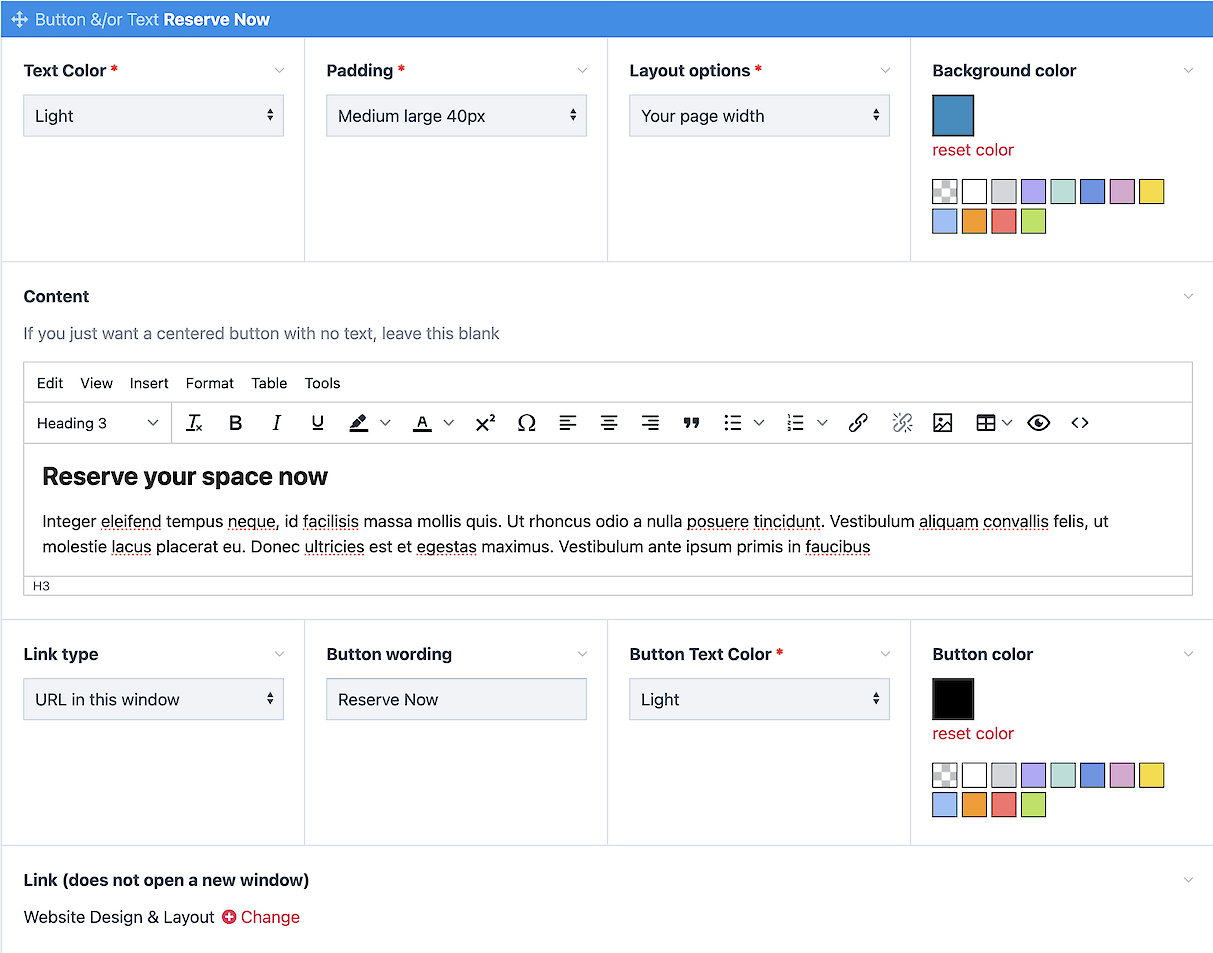
A Call-to-Action display that supports just a button or text and a button

  1. Click the link to add a block for Text and/or Button - you can have as many or as few as you like...
  2. Choose your text and background colors
  3. Choose overall padding and width
  4. Add your content, and a button. For a centered button only, do not add content. 

Reserve your space now

Integer eleifend tempus neque, id facilisis massa mollis quis. Ut rhoncus odio a nulla posuere tincidunt. Vestibulum aliquam convallis felis, ut molestie lacus placerat eu. Donec ultricies est et egestas maximus. Vestibulum ante ipsum primis in faucibus  

Reserve Now
Reserve Now
The Help Site

Creative Consulting • Design for People • Smarter Programming • Global Publishing • Contact: Holly@HollyWorks.com
Digital publishing by Boilerplate Books | Privacy Policy & Accessibility | Southern Maine | ProcessWire Made Easy: Tutorials

BoilerPlate Books, LLC | Holly Valero | HollyWorks Web Design | LinkTr.ee